

Diagnose and fix Google Antigravity & 9router eligibility errors in seconds.
Eligibility check failed: Your current account is not eligible for Antigravity.
There was an unexpected issue setting up your account.
Your current account is not eligible for gemini code assist for individuals at this time.
403 Forbidden — VALIDATION_REQUIRED
Sound familiar? This tool fixes it.
Resolves: 9router 403 errors · Antigravity account not eligible · Gemini Code Assist login failures · Phone number verification stuck on smartphone · Stale OAuth credentials
Also works for 9router and other providers that use Google Antigravity / Gemini Code Assist as their backend.
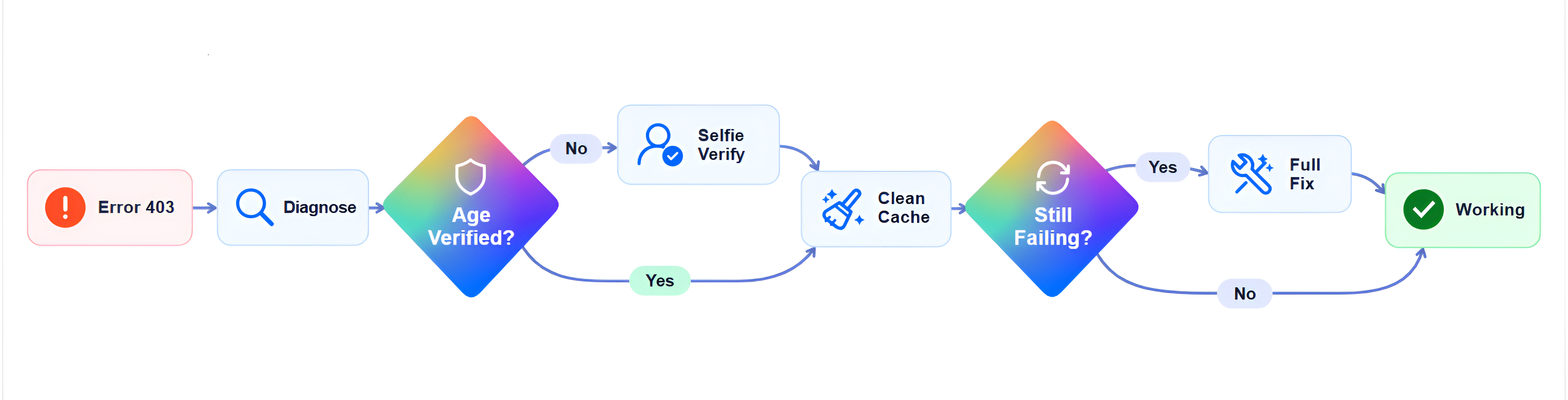
Prerequisites · Install · Usage · AI Agent Guide · Uninstallation · Troubleshooting
An open-source CLI tool that diagnoses and fixes the "Your current account is not eligible for Antigravity" and "not eligible for Gemini Code Assist for individuals" errors that show up when logging into Google Antigravity (IDE or CLI), 9router, or any provider built on top of the same backend.
Designed to be used by humans and AI coding agents — clone, run, done.
Before running this tool, ensure you have:
- Google Antigravity installed — either the CLI (
agy) or Antigravity Desktop App / IDE. - Python 3.10+ installed on your system.
git clone https://github.com/fulldiagnose/antigravity-fixer.git
cd antigravity-fixer
pip install -r requirements.txt
Dependencies:
Run the interactive fixer:
python fix.pyFollow the guided steps on screen:
- Choose Language: Select 🇮🇩 Bahasa Indonesia or 🇺🇸 English.
- Enter Google Account: Provide your
@gmail.comemail & password (used in-memory only, never saved). - Automated Cleanup: Kills stuck processes, removes credentials, and clears cache across:
- Antigravity CLI (
~/.gemini/antigravity*,~/.antigravity) - Antigravity Desktop App & IDE (
AppData/Application Support/.config) - Windows Credential Manager / Keychain / Secret Service
- Antigravity CLI (
- Revoke App Permission: Automatically revokes stuck OAuth connections in your Google Account.
- Selfie Verification: Automatically launches an Incognito browser to
myaccount.google.com/age-verification. Complete the selfie check and press Enter. - Automatic Antigravity CLI Login Test:
- Immediately after selfie verification, a new terminal opens and runs
agy. - Select option 1 in the Antigravity CLI login menu.
- Let
agyopen the official Google sign-in page automatically—this fixer does not open a separate OAuth URL. - Sign in with the Google account that just completed selfie verification.
- Google displays an authorization code (usually starts with
4/0A...). - Copy the code and paste it into the waiting
agyprompt:Or, paste the authorization code here and press Enter: - Press ENTER to complete sign-in.
- Immediately after selfie verification, a new terminal opens and runs
If you only want to purge local cache, credentials, and background processes without revoking:
python fix.py --clean-onlyThis tool is designed to be called by AI coding agents (Hermes, Aider, Cursor, Codex, etc).
Recommended workflow:
Step 1 → Verify Google Account age verification:
         Instruct user to complete selfie check at https://myaccount.google.com/age-verification

Step 2 → python fix.py --clean-only
         Purge stale credentials, CLI cache, and Desktop App/IDE state

Step 3 → agy
         Select option 1, let agy open Google sign-in, then copy the 4/0A... authorization code from the browser and paste it into agy
Error persists after fix
Most common cause: age verification not completed.
- Open
https://myaccount.google.com/age-verificationin your browser. - Choose "Take a selfie" and follow the on-screen instructions.
- Once approved, run
python fix.py --clean-onlyand launchagyagain.
Browser login timeout
- Make sure your internet connection is stable.
- Disable VPN or proxy if active.
Credentials not removed
Run terminal as Administrator (Windows) or with proper permissions, then run:
python fix.py --clean-onlyWorkspace / G Suite account
Antigravity only supports personal @gmail.com accounts.
Google Workspace accounts (work/school email) are not eligible — this is a Google limitation, not a bug.
9router / third-party provider errors
9router and similar providers route requests through Google Antigravity / Gemini Code Assist.
The same root causes apply — run python fix.py diagnose to identify the issue,
then follow the same fix steps. The error message might differ slightly, but the solution is identical.
antigravity-fixer/
├── fix.py                       # CLI entry point
├── requirements.txt             # Dependencies
├── LICENSE                      # MIT
└── antigravity_fixer/
    ├── __init__.py
    ├── checker.py               # Account diagnosis (age, country, subscription)
    ├── cleaner.py               # Credential & cache cleanup
    ├── browser.py               # OAuth revoke & re-auth
    └── constants.py             # Supported countries, URLs, paths
To completely uninstall Antigravity Fixer and all its dependencies, just run:
python fix.py --uninstallOr manually:
pip uninstall -r requirements.txt -yThen simply delete the antigravity-fixer folder. Done!
- Passwords are only prompted at runtime via
getpass— never written to disk or logs - Browser sessions are ephemeral (headless, no persistent state)
- This tool does not send data to any external server — all operations are local or directed at official Google account pages
- Source code is open — audit it yourself if in doubt
Antigravity is available in 190+ countries including Indonesia, Malaysia, Singapore, and more.
Full list: constants.py or official Google docs.
MIT — free to use, modify, and distribute.